|
AVR-NET-IO |
|||||||||||||||||||||
|
Beschreibung: Mit dieser Seite soll gezeigt werden, wie man mit dem Bausatz der Fa. Pollin Elektronik und einer Relais-Karte, über das interne Netzwerk oder das Internet Geräte fernschalten und Schaltzustände von Geräten fernabfragen kann. Momentan nutze ich diese kleine Elektronik, mit einem ATMega32-Microcontroller von Atmel, um 2 Computersysteme alternativ zur Startmöglichkeit per Telefon (siehe meine "PC-Fernstart-Seite") auch über das Internet (fern) zu schalten. Die kleine Karte hat 8 Schaltkontakte, 4 digitale Eingänge und 4 analoge 10-Bit- Eingänge. D. h. mit diesem Teil könnt Ihr 8 Geräte Ein/Aus-Schalten, 4 Schaltzustände (Ein oder Aus) abfragen und 4 Messwerte (Temperatur, Luftfeuchtigkeit, Umdrehung, Helligkeit, etc.) abfragen. Die AVR-NET-IO-Karte kann über eine serielle Schnittstelle, das Internet und/oder über Euer internes Netzwerk angesteuert werden. (Inzwischen habe ich noch ein Programm namens "OliFUNK" zur Ansteuerung von bis zu 16 Funksteckdosen für das AVR-NET-IO mit einer Relaisplatine (z. B. K8IO) und einem Funkhandsender geschrieben. "OliFUNK"-Programm von Oliver Schlenker für das AVR-NET-IO-Board Falls Ihr allerdings Programme zum (Fern)Schalten von Geräten, (Fern)Abfragen/(Fern)Aufzeichnen von Schaltzuständen und (Fern)Überwachung von Schaltzuständen für das AVR-NET-IO-Board sucht, solltet Ihr diesen Bericht einfach weiter lesen.) Den Bausatz der Platine könnt Ihr unter http://www.pollin.de bestellen. Die Artikel-Nr. lautet: 810 058. Für Leute, die keinen Lötkolben in die Hand nehmen wollen oder können, bietet Pollin auch eine bereits fertig aufgebaute Platine unter Artikel-Nr. 810 073 an. Ansonsten "AVR-NET-IO" als Suchbegriff auf der Pollin-Seite eingeben. Dort könnt Ihr Euch auch das Handbuch mit dem Aufbau und den Befehlen für die Platine runterladen und anschauen. Des weiteren bekommt Ihr auch eine einfache Steuersoftware für die Platine. Allerdings konnte ich mit dieser Software meine Platine nur über das interne Netzwerk, nicht aber über das Internet bedienen. Deshalb habe ich mir meine eigenen Programme zum "Steuern", zur "Datenaufzeichnung" und zur "Zustandsüberwachung" geschrieben. Wie Ihr auf den folgenden Bildern sehen könnt, habe ich mir die "Relais-Platine", zum Schalten der einzelnen Geräte und Rückmeldung der digitalen Eingänge, selbst gebaut. Auch hier bietet Pollin selbst was an. Dort bekommt Ihr auch eine Relaiskarte namens "K8IO" Artikel-Nr. 710 722 als Bausatz. Diese lässt sich direkt auf das AVR-NET-IO-Board aufstecken. Dort werden dann die zu schaltenden Geräte und digitalen Eingänge ebenfalls direkt angeschlossen! Das K8IO läuft auch direkt am Parallel-Port eines PCs. Der Vorteil des AVR-NET-IO ist auch, dass man Geräte direkt über das Internet schalten kann, ohne einen Rechner oder andere Hardware permanent laufen lassen zu müssen.
(Um die Grafiken klarer und detaillierter zu
sehen, solltet Ihr einen Klick mit der linken Maustaste
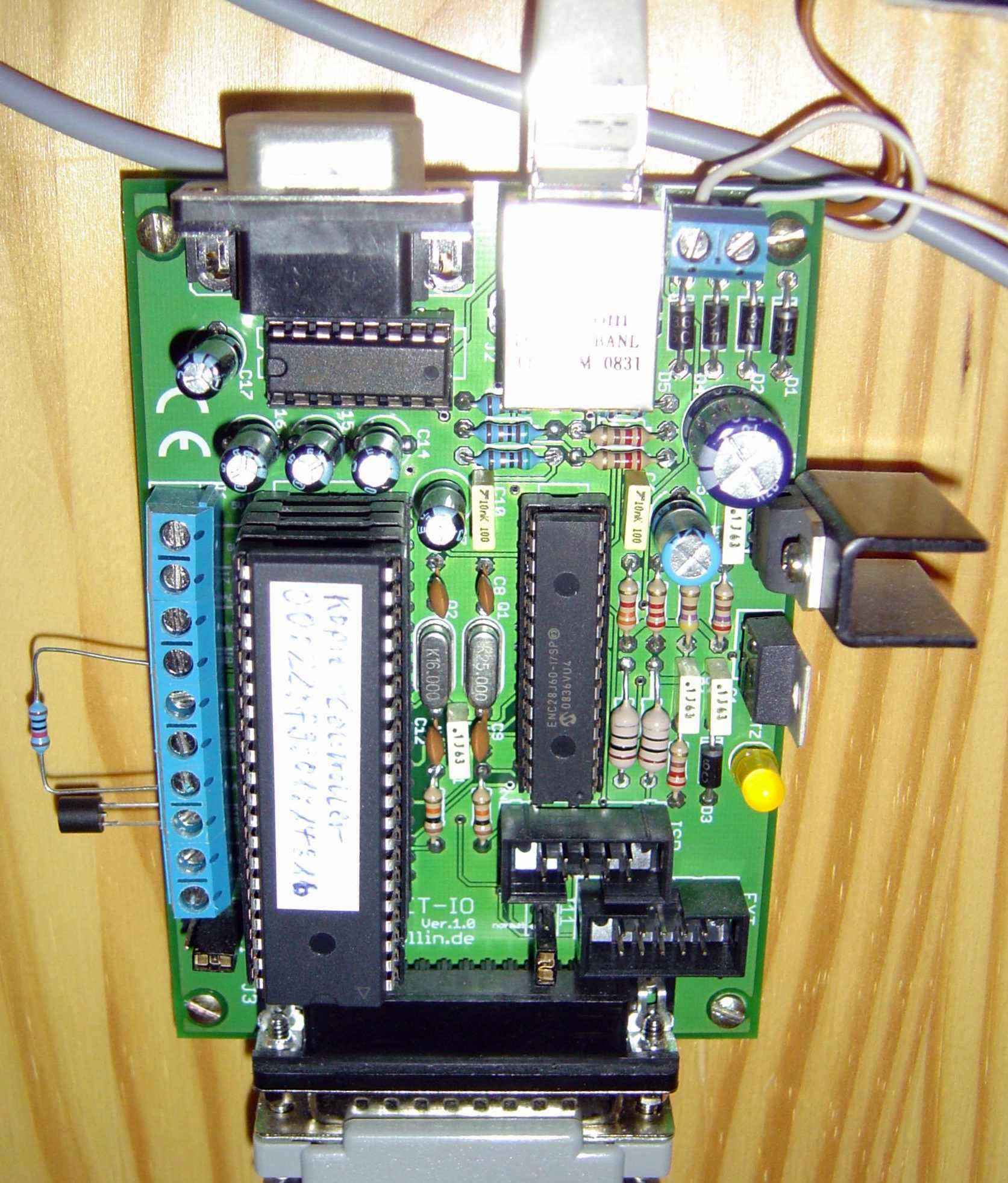
Hier ein Bild meines fertig aufgebauten
AVR-NET-IO-Boards:
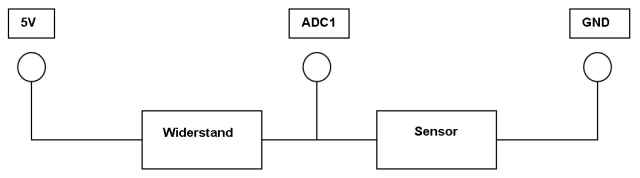
Hier mal ein Anschluss-Schema für analoge
Sensoren an das AVR-NET-IO-Board
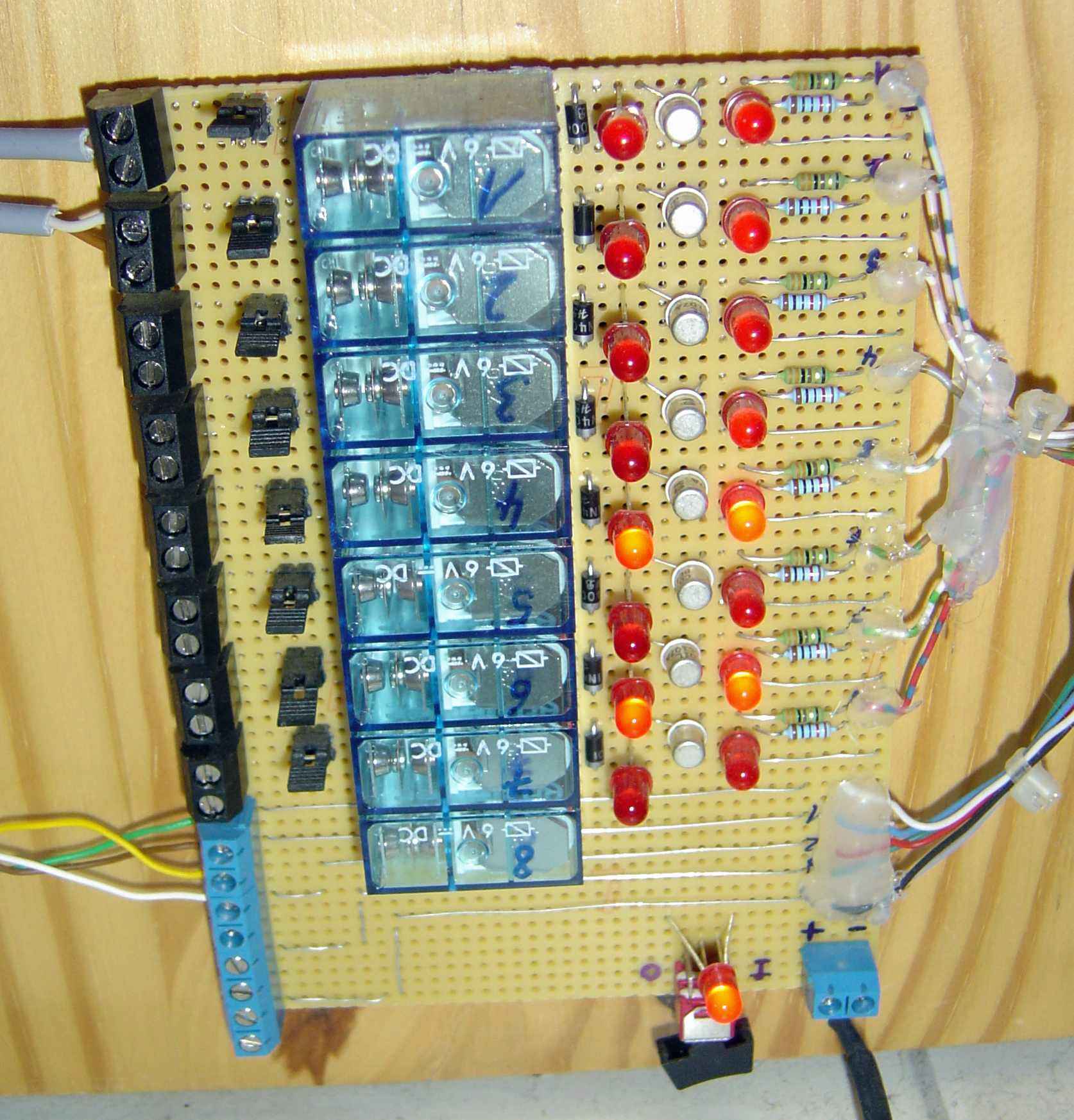
Hier ein Bild meiner selbst gebastelten
Schaltplatine: Auf der rechten Seite seht Ihr die 8 Datenleitungen zum Schalten der Relais (und die 4 digitalen Eingänge zur Rückmeldung an das AVR-NET-IO), die vom grauen Sub-D-25pol-Stecker vom AVR-NET-IO-Board kommen und dann, über die Transistoren und Relais (mit Freilaufdioden), auf die schwarze (8x digitaler Schaltausgang) und blaue (4x analoger Messwerteingang) Klemmenleiste gehen! An diese Platine habe ich ein Netzteil mit 7,5V=Â angeschlossen. Vor und nach den Schalttransistoren, seht Ihr je eine Reihe LEDs. Die erste Reihe zeigt ein ankommendes Schaltsignal vom AVR-NET-IO-Board an. Die 2. Reihe zeigt (bei eingeschalteter Stromversorgung) den momentanen Relaiszustand an. Nach den Relais habe ich noch Jumper verbaut, um den Öffner oder den Schließer des Relais an den Anschlussklemmen entsprechend zu nutzen. (Manchmal möchte man ja vielleicht mit dem Schalten etwas unterbrechen und nicht schließen!) An der schwarzen Steckerleiste werden die zu schaltenden Geräte angeschlossen. Momentan habe ich hier auf Relais-Nr. 1 meinen FreeNAS-FileServer (FreeBSD) und auf Relais-Nr. 2 einen Windows-Rechner (VNC-Server) angeschlossen. An der blauen Steckerleiste habe ich die Eingänge Digital 1 und 2 mit einem Rückmelderelais der einzelnen Rechner beschaltet (siehe unten links die Drähte grün+braun, gelb+weis). (Inzwischen ist noch auf Relais-Nr. 8 ein FreeNAS-WebServer und auf Digital 4 die Rückmeldung für dieses Gerät dazu gekommen. Diese Homepage lest Ihr im Moment von diesem WebServer. Bisher habe ich allerdings nur die Snapshots der Software-Module und nicht die Hardware-Bilder aktualisiert. Der Anschluss der Geräte bzw. Hardware ist ja ohnehin immer gleich.) Durch ein "Rückmelderelais" in den einzelnen Rechnern, welches dann auf einen digitalen Eingang gelegt wird, kann ich bei Aufruf meiner Steuersoftware oder des Datenloggers sofort sehen, ob ein Gerät noch "Online" ist oder nicht. Hier ein Bild meines angeschlossenen LCD-Panels (incl. selbst gebastelter Ansteuerungsplatine):
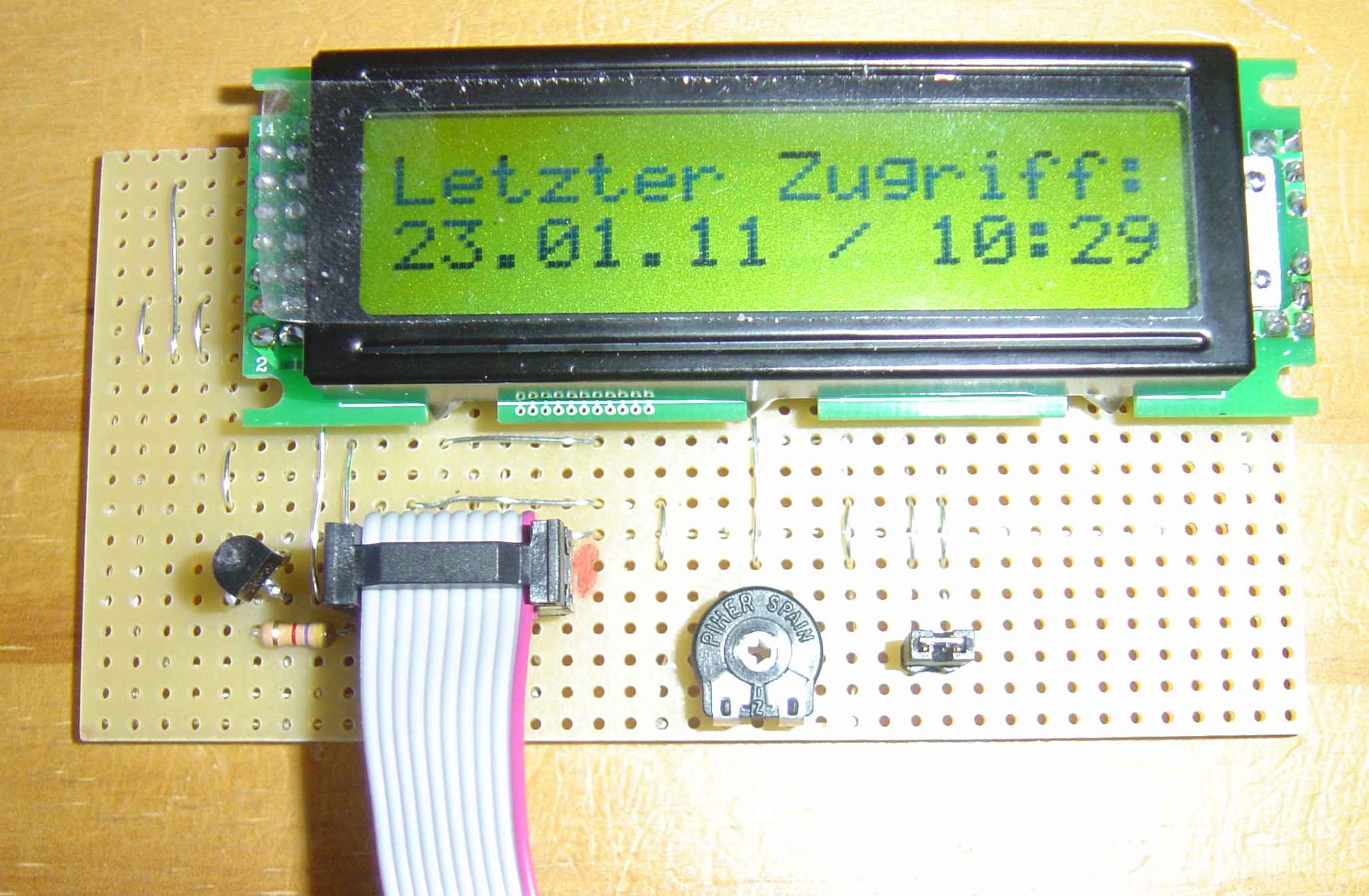
Seit dem 23.01.2011 habe ich noch ein LCD-Panel an
das AVR-NET-IO-Board angeschlossen. Das Panel zeigt mir an, wann der letzte
Zugriff mit dem Steuerprogramm auf das AVR-NET-IO-Board stattgefunden hat. Ab
meiner Steuersoftware-Version 1.3 werden LCD-Panels mit HD44780-Controller
korrekt angesprochen. Es handelt sich um das LCD-Modul
Typ: TC1602E-01 von der Fa. Pollin (http://www.pollin.de)
mit der Bestell-Nr. 120 420. Aus einem leider nicht mehr existenten AVR-NET-IO-Forum, habe ich einen
Schaltplan zum Anschluss dieses LCD-Panels an den externen Port des
AVR-NET-IO-Boards gefunden.
Mit dem Poti regelt man den Kontrast der Zeichen auf dem Display und mit dem
Jumper kann man die Hintergrundbeleuchtung aktiveren oder deaktivieren.
Ansonsten
dürften die Software-Module selbsterklärend sein. Am Ende dieser Seite könnt Ihr
Euch gerne jeweils eine Testversion herunterladen, um die Funktionen meiner
Programme mit Eurem AVR-NET-IO-Board
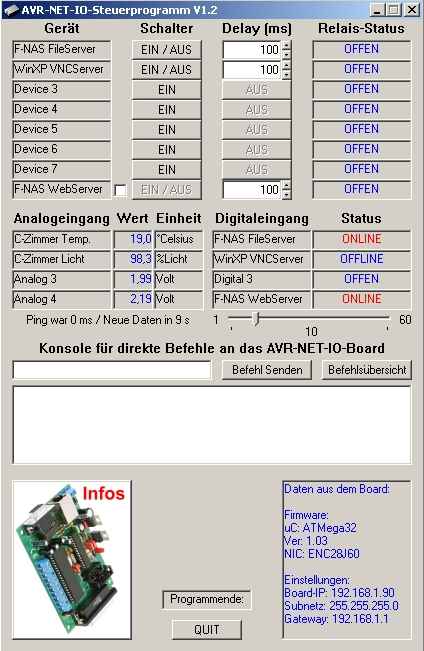
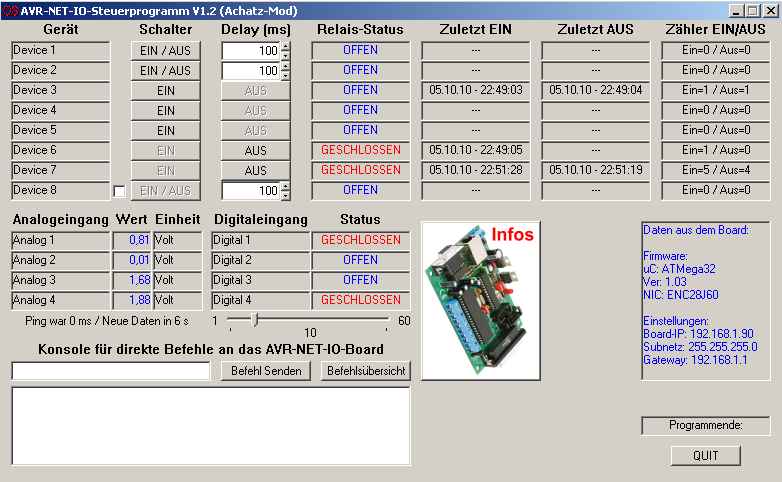
auszuprobieren. Hier seht Ihr Snapshots meiner selbst erstellten Steuersoftware: Einmal in der klassischen Windows-Ansicht:
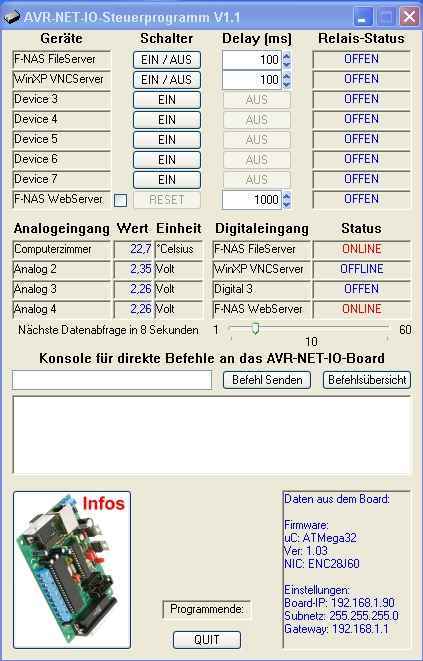
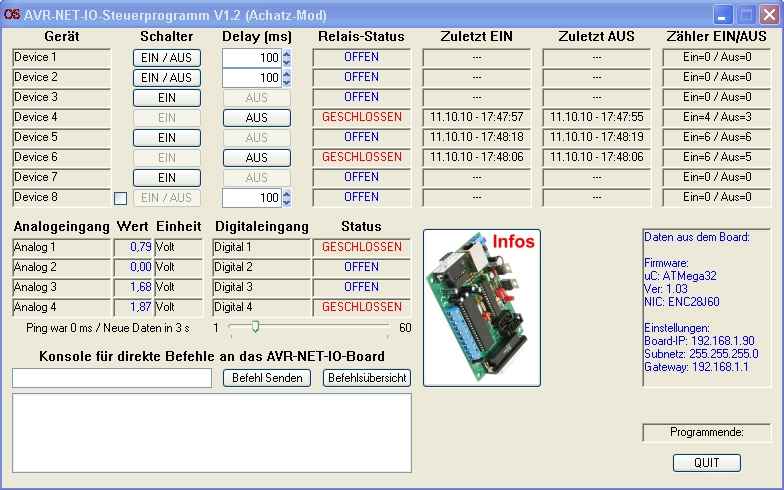
Und auch in der Windows-XP-Luna-Ansicht:
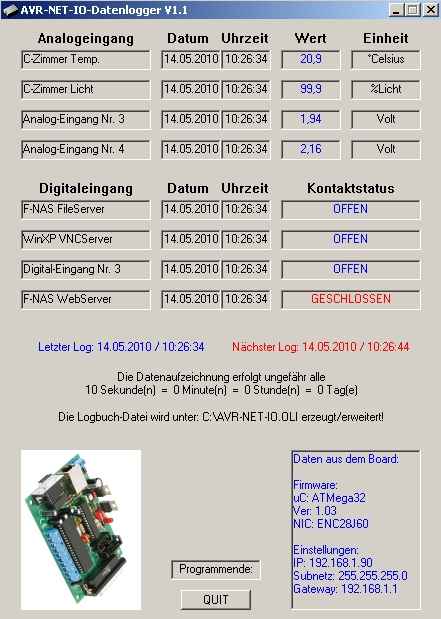
Und hier Snapshots meines selbst erstellten Daten-Logger-Moduls: Einmal in der klassischen Windows-Ansicht:
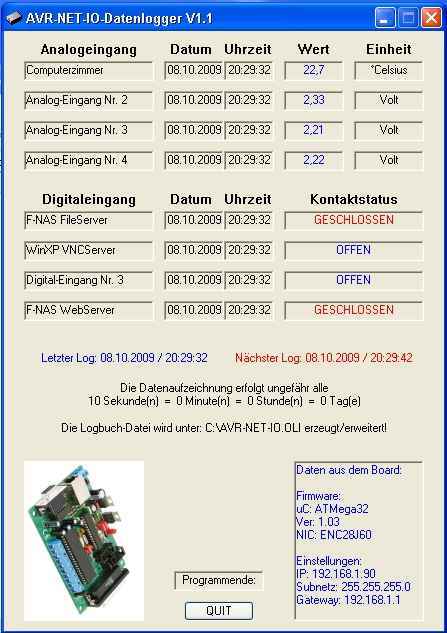
Und auch in der Windows-XP-Luna-Ansicht:
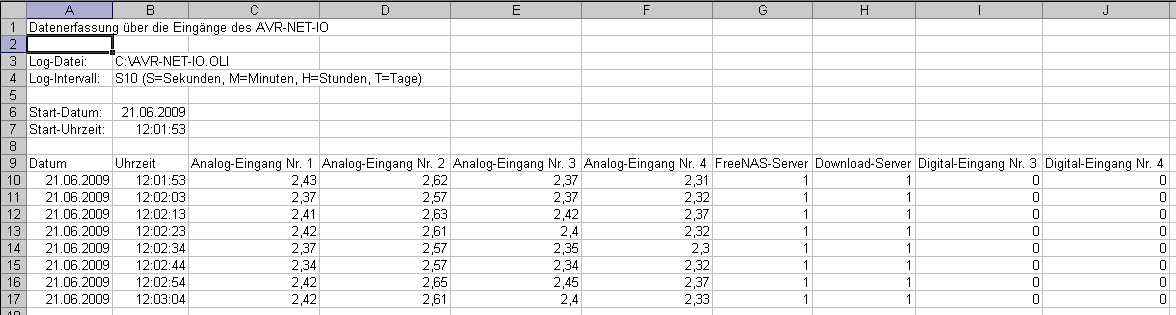
Hier seht Ihr ein aufgezeichnetes Logbuch des Daten-Logger-Moduls als Excel-File:
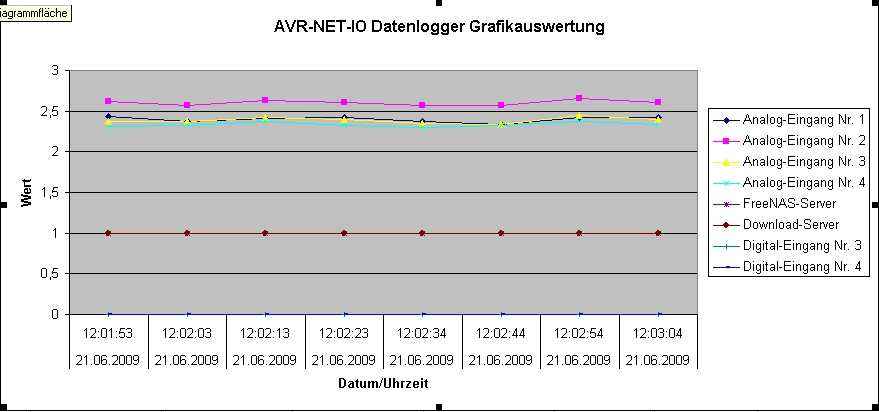
Und hier die entsprechende Grafikauswertung der aufgezeichneten Daten:
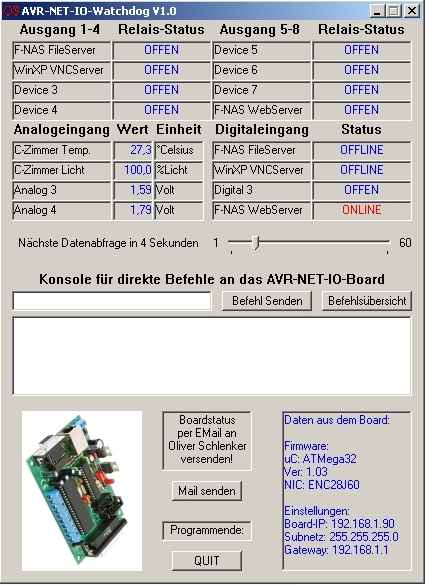
Und hier Snapshots meines selbst erstellten Watchdog-Moduls: Einmal in der klassischen Windows-Ansicht:
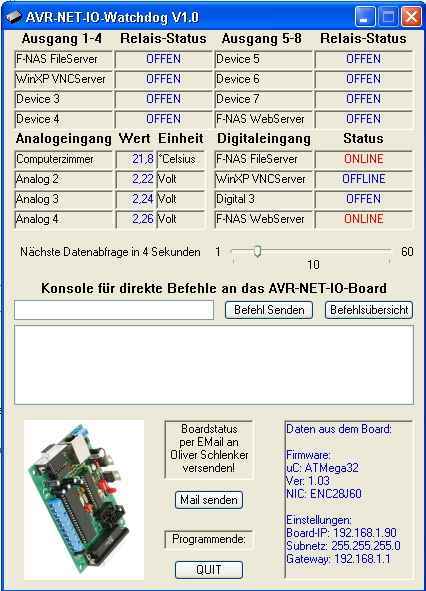
Und auch in der Windows-XP-Luna-Ansicht:
Meine Programme unterstützen
die Windows-Design-Einstellungen.
Hier noch der Snapshot einer modifizierten Version des AVR-NET-IO-Steuerprogramms: Einmal in der klassischen Windows-Ansicht:
Und auch in der Windows-XP-Luna-Ansicht:
Download der Demoversion von
Steuerprogramm AVR-NET-IO.EXE
Allgemeines:
ACHTUNG: Da die Mailprovider auf
SSL-Verschlüsselung beim Mailverkehr umgestellt haben,
Ansonsten würde ich mich freuen, wenn dieses kleine Projekt Euer Interesse
findet und Ihr mit mir
Ich denke dem Einsatz
dieser kleinen Platine und meiner Software sind nur durch Eure Phantasie Grenzen gesetzt.
Man kann damit praktisch jedes elektrische oder elektronische Gerät über ein
Inzwischen haben schon einige
Leute meine Software in Gebrauch Jdrama Google Drive | Folder LinkYou clicked on an article for a "jdrama google drive folder link," so you likely expect raw utility. However, as a responsible guide, I must explain the status quo. Are these legal? Generally, no. Google Drive's Terms of Service prohibit sharing copyrighted material without permission. Japanese broadcasters (TBS, Fuji TV, NTV) hold strict copyrights. Most folder links are technically piracy. What happens if you click a link? The "Virus" Danger Many search results for jdrama google drive folder link lead to fake pages. Here is how to spot a fake: J-drama Google Drive folders are a preservation project disguised as piracy. For every fan downloading Alice in Borderland (already on Netflix), there are ten fans trying to watch a 1987 Asadora that never left VHS. My advice: Use Drive links for the unavailable classics, but stream legally when you can. And if you find a great folder? Don’t post the link publicly. Share it via DM. That’s how the folder survives another week. Have a favorite J-drama you found only on Drive? Let us know in the comments—without posting the actual link, please. Looking for specific J-drama titles or a general collection link? Trying to find communities (like Reddit or Discord) where these links are regularly shared? Looking for instructions on how to create and share your own folder link for J-dramas? Title: The "Google Drive Method": Accessing J-Drama Content in the Digital Age Introduction In the world of international Japanese drama (J-Drama) consumption, the "Google Drive link" has become a ubiquitous, yet often unspoken, method of access. Unlike Western media, which is largely consolidated into a few major streaming giants, the landscape for J-Dramas is fragmented. While platforms like Netflix and Disney+ have begun investing heavily in Japanese content, a vast archive of older series, niche genres, and unfinished simulcasts remains largely inaccessible through official subscriptions. This gap has given rise to a unique ecosystem of file sharing, with Google Drive emerging as the preferred medium for collectors and viewers alike. The Appeal of the Google Drive Folder Unlike torrenting, which requires specific software, seed ratios, and carries the stigma of ISP monitoring, Google Drive offers a seamless user experience. The Community Ecosystem The existence of these links is driven by a dedicated subculture of fansubbers and archivists. In the pre-streaming boom, fan-run translation groups were the primary gatekeepers of J-Dramas. Their work involved not just translating, but timing, typesetting, and encoding episodes. These groups, or independent collectors, utilize Google Drive to distribute "hard-subbed" (subtitles burned into the video) files. Navigating this world often involves traversing through forums (like MyDramaList), niche Discord servers, Reddit communities (such as r/JDrama), and dedicated indexing sites (like drama-wiki). The links are treated as digital currency, shared privately to avoid takedown notices. The "Grey" Legal Area It is important to address the legal reality of Google Drive folders containing copyrighted television broadcasts. These links exist in a significant legal grey area. The Shift in Consumption Trends The reliance on Google Drive is slowly shifting. The international success of anime and the "J-Wave" (including the popularity of K-Dramas) has prompted streamers to take notice. Netflix, for instance, has produced high-budget J-Dramas (e.g., The Naked Director, First Love) that are available globally. Furthermore, new legal platforms like Viki and localized services are acquiring back-catalogs. However, until the licensing becomes comprehensive enough to cover the decades of Japanese TV history, the Google Drive folder will likely remain a staple infrastructure for the dedicated J-Drama enthusiast. Conclusion The "J-Drama Google Drive link" is more than just a method of piracy; for many, it is a preservation tool and a bridge to a culture that is otherwise gatekept by complex licensing laws. While it operates outside legal boundaries, it has successfully sustained a global fanbase for decades, keeping the genre alive and thriving in the international consciousness until official distribution can catch up. Disclaimer: This write-up is for informational purposes only and does not endorse or encourage the distribution or consumption of copyrighted material without permission. I understand you're looking for a paper related to "J-drama Google Drive folder links," but I cannot produce an academic or formal paper that primarily serves to share or promote links to copyrighted content (such as J-dramas shared via Google Drive without authorization), as that could facilitate copyright infringement. However, I can help you write a legitimate research or discussion paper on related topics, such as: If you'd like, I can write a sample academic-style paper outline or introduction on one of these legitimate topics. Just let me know which direction interests you. That is an interesting post title, because it points to a few things happening at once: Legal alternatives: If you're interested in jdramas legally, check Viki, Netflix (search "Japanese drama"), Disney+ (increasingly strong catalog), AsianCrush, or RetroCrush. For current-season dramas with English subs, Viki and Netflix are best. So the "interesting" part is that the post highlights both fan dedication and copyright tension—it's a tiny window into how global audiences actually access media when legal options are limited. Searching for "JDrama Google Drive folder links" often leads to communities of fans sharing their favorite Japanese shows. While these links are popular among international viewers, they exist in a legally gray area and often face copyright takedowns. What are JDrama Google Drive Folders? These are cloud storage folders curated by fans that contain entire series of Japanese dramas, often including hard-to-find titles or those without official international streaming options. They typically include: Raw Files: The original Japanese broadcasts. Subbed Episodes: Files with fan-made English (or other language) subtitles. OSTs: Official soundtracks and theme songs. Where to Find Them Because these folders frequently change or get deleted due to copyright strikes, you won't usually find a "permanent" link on the open web. Instead, they are shared in private or semi-private communities: Reddit: Subreddits like Discord Servers: Many fan-subbing groups host their own Discord servers where they post direct links to their latest projects. Social Media: On X (formerly Twitter) and Tumblr, fans use specific tags like #JDrama or #Fansub to share updated links. Risks and Considerations Copyright Takedowns: Google frequently scans for copyrighted material. A link that works today may be "404 Not Found" tomorrow. Quota Limits: If too many people try to view or download from a link at once, Google will block access for 24 hours. Many users "Make a Copy" to their own drive to bypass this. Safety: While most fan-shared drives are safe, always be cautious about downloading executable files (.exe). Stick to video formats like .mp4 or .mkv. Official Alternatives If you prefer stable, high-quality streams that support the creators, consider these platforms: Netflix & Viki: Both have significantly expanded their JDrama libraries recently. Disney+: Now hosting exclusive Japanese content like Gannibal. TVer: A free (VPN required) Japanese service that broadcasts current dramas. Finding specific "JDrama Google Drive folder links" via public articles is often difficult because these links are frequently private or removed due to copyright policies. Instead of a single "master list," most useful resources focus on how to safely access and manage these links or where to find communities that share them. Finding JDrama Links Safely Direct links to dramas are usually shared within niche communities rather than public articles to avoid "dead links." Community Forums: Sites like MyDramaList and various J-Drama subreddits are the primary hubs where fans share links to "subbing groups" who often host their work on private drives. Subbing Group Sites: Many fansubs maintain their own master lists. You can find these by searching for specific drama titles plus "fansub" on databases like the Fansub Map. Managing Google Drive Links jdrama google drive folder link If you find a folder link, keep these technical details from Google Drive Support in mind: Requesting Access: Many folders are set to "Restricted." You may need to click "Request Access" to send a notification to the owner. Playback Limits: Google Drive has a maximum playback resolution of 1920 x 1080. If a file is 4K, you may need to download it to watch it in full quality. "Anyone with the link" Risk: Be cautious when clicking public links. Security experts at Stanford University IT warn that "Anyone with the link" settings can sometimes expose your own account activity if you interact with the files while logged in. Avoiding Common Issues Quota Exceeded: Popular dramas often hit a "download quota." A common workaround is to "Make a copy" of the file to your own Drive, though this requires you to have enough storage space. Expired Links: If a link leads to a "404 Error," the owner has likely deleted the folder or changed the permissions to private. Share files from Google Drive - Computer Finding a reliable JDrama Google Drive folder link has become a popular quest for fans of Japanese television, especially those seeking older classics or high-quality fansubbed releases that aren't available on mainstream streaming platforms. Because Japan’s domestic market is self-sufficient and copyright laws are strictly enforced, many JDramas remain difficult to access internationally without community-shared resources. Why Fans Search for Google Drive Links Unlike many Korean or Chinese dramas that are mass-produced for global audiences, Japanese dramas often focus on a domestic audience. This leads to several challenges that Google Drive folders help solve: Accessibility: Many titles, especially from the 90s and 2000s, are not licensed for international streaming. Video Quality: Dedicated fans often upload "RAW" files or high-definition encodes that surpass the quality found on older streaming sites like Dailymotion or YouTube, which often suffer from copyright-related audio cuts. Hardcoded vs. Soft Subs: Google Drive allows users to download files and use media players like VLC to toggle between different subtitle tracks or hide them entirely for language learning. How to Find JDrama Links Safely Finding these "needles in a digital haystack" requires patience and a focus on community-vetted sources. The link to a massive collection of Japanese Dramas can be found in this community-shared Google Drive. The Digital Archivist Kaito lived in a cramped apartment in Tokyo, surrounded by physical media that had long since lost its luster. He was a "Digital Archivist" by night—a title he gave himself to sound more professional than "guy who hunts for dead links." His white whale? A legendary Google Drive folder rumored to contain every JDrama from the 90s, untouched by copyright takedowns. One rainy Tuesday, a message appeared in an obscure forum: a single, blue hyperlink. Kaito clicked. His screen filled with icons—thousands of them. Names like Long Vacation and GTO stared back at him in crisp 1080p. He didn't just watch them; he curated them. He organized the folders by year, added subtitle tracks for learners, and shared the link with a community of fellow enthusiasts. To Kaito, these weren't just files. They were digital time capsules of a Tokyo that once was. 💡 Quick Tips for Drama Folders Quota Errors: If a file says "download quota exceeded," wait 24 hours or copy it to your own Drive. Subtitles: Many Drive files have "soft subs." Use VLC Media Player to toggle them on or off. Alternatives: If links die, check trackers like Nyaa.si or communities on Reddit's JDrama sub. The Ultimate Guide to Finding JDrama Google Drive Folder Links Are you a fan of Japanese dramas, also known as JDrama? Do you enjoy watching your favorite shows, but struggle to find reliable sources to stream or download them? Look no further! In this article, we'll explore the world of JDrama Google Drive folder links, and provide you with a comprehensive guide on how to find and access these links. What are JDrama Google Drive Folder Links? For those who may not know, JDrama Google Drive folder links are shared folders on Google Drive that contain episodes of Japanese dramas. These folders are often created and shared by fans or enthusiasts who want to make JDrama more accessible to a wider audience. The links to these folders are typically shared online, allowing others to access and watch their favorite shows. Benefits of Using JDrama Google Drive Folder Links There are several benefits to using JDrama Google Drive folder links: How to Find JDrama Google Drive Folder Links Finding JDrama Google Drive folder links can be a bit tricky, but don't worry, we've got you covered. Here are some ways to find these links: How to Access JDrama Google Drive Folder Links Once you've found a JDrama Google Drive folder link, accessing it is relatively straightforward: Tips and Precautions While using JDrama Google Drive folder links can be a great way to access your favorite shows, there are some tips and precautions to keep in mind: Conclusion JDrama Google Drive folder links offer a convenient and free way to access a vast collection of Japanese dramas. By following the tips and guidelines outlined in this article, you can enjoy your favorite shows while supporting the JDrama community. Happy watching! FAQs Q: Are JDrama Google Drive folder links legal? A: The legality of JDrama Google Drive folder links can be complex. While some dramas may be shared with permission from the creators, others may not be. It's essential to be aware of the copyright laws in your country and to support official releases when possible. Q: Can I upload my own JDrama to Google Drive and share the link? A: While it's technically possible to upload your own JDrama to Google Drive and share the link, be cautious of copyright laws and respect the intellectual property rights of the creators. Q: What if the Google Drive folder link doesn't work? A: If the link doesn't work, try checking the link again, or reach out to the person who shared the link to see if it's been updated or removed. Q: Can I request a specific JDrama Google Drive folder link? A: While it's not possible to directly request a specific link, you can try searching online or reaching out to JDrama communities to see if anyone has shared a link to the drama you're looking for. Finding reliable J-drama Google Drive links can be difficult because they are frequently taken down due to copyright. For the most up-to-date access as of April 2026, it is best to follow dedicated fansubbers who use Google Drive for their projects or use community-curated masterlists. � Active Google Drive Folders Rjgman56's Archive : A well-known fansubber who hosts a variety of subbed dramas and movies on their personal Google Drive folder Community Shared Folders : Occasionally, users on share specific links, such as this recently shared folder found in MyDramaList comment sections. � Where to Find More Links If specific links are broken, these platforms are the primary hubs for new "J-drama Google Drive" posts: Drama-Otaku You clicked on an article for a "jdrama : The most recommended site for high-quality files directly from fansubbers. You can find many subbers there who provide private links to their work on Drama-Otaku D-Addicts Fansub Map D-Addicts Fansub Map to see who is currently subbing a drama. It often links to the subber's Twitter or blog where they post their Google Drive links. Independent Fansubbers on X (Twitter) : Many fansubbers post updates and temporary Drive links directly on their X accounts to avoid automated takedowns. 💡 Pro-Tip for Google Drive Links If a link says "Download quota exceeded," you can often bypass this by: Signing into your Google account. Right-clicking the file and selecting "Make a copy." Downloading the copy from your own Drive. Finding a reliable Google Drive folder for JDramas is a popular way to watch series that aren't available on major streaming platforms. These community-curated drives often include high-quality files with fan-translated subtitles. How to Find JDrama Folders Since direct links are often taken down due to copyright, the best way to find active drives is through "link hubs" and community forums: Discord Communities: Join drama-focused Discord servers (like the JDrama Discord ). They often have dedicated channels for "Resource Masterlists" where active Google Drive links are pinned. Carrd Hubs: Search for "JDrama Carrd" on Twitter or Google. Fans create navigation pages (e.g., jdramaresources.carrd.co ) that catalog active drives by genre or year. Check the sidebar or "Useful Links" section of subreddits like . Users frequently share "Master Mega-Threads" containing organized cloud storage links. Fansub Maps: Fansub Map (available on various drama blogs) to find specific subbers. Many subbers host their work on their own private Google Drives, accessible via a link on their profile or blog. Tips for Using Shared Drives "Make a Copy": If a drive is busy or close to its download limit, right-click a file and select "Make a copy" to save it to your own Drive first. Check for "Softsubs": Many drives provide the video (RAW) and subtitles (.ASS or .SRT) separately. Ensure you download both and keep them in the same folder with identical filenames to watch. Request Access: Some high-quality drives are "Hidden." You may need to join a specific LiveJournal group or follow a subber on social media to get the password or access link. general collection from a particular era? While it might be tempting to search for a "JDrama Google Drive folder link," using such links carries significant risks, including potential malware exposure and frequent copyright takedowns . Instead, you can access a massive library of high-quality Japanese dramas through established legal platforms, many of which offer free tiers. Valence Security Recommended Legal Streaming Services For the best viewing experience with official subtitles, consider these platforms: Crunchyroll Finding a reliable jdrama google drive folder link is often the primary goal for fans seeking high-quality, ad-free Japanese dramas that are difficult to find on mainstream platforms. While these links offer a "treasure trove" of classic and recent series, navigating the world of shared folders requires caution and specialized search techniques. Why Fans Seek Google Drive Links Many viewers prefer Google Drive links over traditional streaming sites for several reasons: Superior Quality: Shared folders often contain high-definition files (720p or 1080p) without the compression issues found on sites like Dailymotion or YouTube. No Intrusive Ads: Unlike free streaming sites that often feature "trashy ads and popups," direct Google Drive links offer a clean viewing experience. Hard-to-Find Classics: These folders frequently archive older series (some dating back to the 1960s) that have never been legally licensed for international streaming. How to Find JDrama Folder Links Because these links are often unlisted, you must use specific search strategies to find them: Advanced Search Operators: Use Google to target specific domains. For example, searching Reddit Communities: Subreddits like r/JDorama, r/ajatt, and r/DataHoarder occasionally share large, community-curated collection links. Fansub Communities: Most Japanese dramas are translated by independent "fansubbers." Reliable networks and platforms like Drama-Otaku or the Jdrama Fansub Map are essential for finding links to subbed projects. Introduction JDrama, short for Japanese Drama, refers to Japanese television dramas or series. With the rise of online streaming and file-sharing platforms, fans of JDrama have been searching for convenient ways to access and share their favorite shows. One popular method is through Google Drive folder links, which allow users to share and access large files and folders. What is a Google Drive folder link? A Google Drive folder link is a URL that allows users to access a specific folder or file on Google Drive, a cloud storage service developed by Google. When a user creates a folder on Google Drive, they can choose to share it with others by generating a link. This link can be used to access the folder and its contents, either by viewing or downloading the files. JDrama Google Drive folder links JDrama Google Drive folder links refer to links that provide access to folders containing Japanese dramas, often shared among fans. These links can be found on various online platforms, including social media, forums, and file-sharing websites. The folders typically contain episodes of JDrama shows, often in various languages, including Japanese, English, and other subtitles. Pros and Cons of using JDrama Google Drive folder links Pros: Cons: Risks and considerations When using JDrama Google Drive folder links, it's essential to be aware of the potential risks: Alternatives to JDrama Google Drive folder links If you're looking for alternative ways to access JDrama shows, consider: Conclusion JDrama Google Drive folder links can be a convenient way to access and share Japanese dramas, but it's essential to be aware of the potential risks and considerations, including copyright issues, malware, and link stability. Fans should consider supporting creators through official streaming services, DVD purchases, or other legitimate channels. By doing so, we can promote a healthy and sustainable ecosystem for JDrama enthusiasts to enjoy their favorite shows. The "Virus" Danger Many search results for jdrama Sharing or accessing Japanese Dramas (J-Dramas) via Google Drive is a common practice among fans to preserve high-quality files and provide easy access for those without streaming subscriptions. How Google Drive Sharing Works Google Drive links for dramas are essentially private folders made accessible through "General access" settings. Anyone with the link: This setting allows users to access the folder without needing specific permission from the owner. Permissions: Most drama folders are set to Viewer mode, allowing you to watch or download the files but preventing you from deleting or editing them. Editor mode: Occasionally, collaborative folders (like those for subbing projects) are set to Editor so multiple people can upload and rename files. Finding and Using J-Drama Folders Drama links are often distributed through community-driven platforms. Share files from Google Drive - Computer Introduction Are you a fan of Japanese dramas (J-Dramas) and struggling to find a reliable source to stream or download your favorite shows? Look no further! This guide will walk you through the process of accessing a J-Drama Google Drive folder link, where you can find a vast collection of J-Dramas to enjoy. What is a Google Drive Folder Link? A Google Drive folder link is a shared URL that allows users to access a specific folder on Google Drive, which contains a collection of files, in this case, J-Dramas. By clicking on the link, you'll gain access to a treasure trove of Japanese dramas, which you can stream or download. Benefits of Using a J-Drama Google Drive Folder Link How to Access a J-Drama Google Drive Folder Link Navigating the Google Drive Folder Tips and Precautions Popular J-Drama Google Drive Folders Here are a few popular J-Drama Google Drive folders to get you started: Conclusion Accessing a J-Drama Google Drive folder link can be a convenient and exciting way to explore the world of Japanese dramas. By following this guide, you'll be able to find and enjoy a vast collection of J-Dramas, from classic hits to recent releases. Happy watching! Finding a reliable JDrama Google Drive folder link can be a game-changer for fans looking for high-quality, ad-free downloads of their favorite Japanese shows. While many viewers rely on streaming services, Google Drive archives are prized for their convenience and lack of intrusive pop-ups. Here is a blog post template you can use to share your findings or guide others on how to find these elusive archives. The Ultimate Guide to Finding JDrama Google Drive Links Are you tired of buffering and endless ads on "free" streaming sites? You aren’t alone. For many J-Drama fans, the holy grail of viewing is the Google Drive folder link —a direct way to stream or download episodes in crisp 1080p without the headache. In this post, we’ll explore how to find these community-driven archives and the best alternatives for 2026. Why Google Drive for JDramas? Google Drive is a favorite for the "dorama" community because it offers: High-Quality Playback: Most shared files are 720p or 1080p. Offline Viewing: You can easily download files for your commute or travel. No Pop-ups: Unlike sites like , there are no risky ads to navigate. How to Find a JDrama Google Drive Folder Link Because these links are often private or frequently updated to avoid takedowns, you won't always find them in a simple search. Here is where the pros look: 1. Follow the Fansubbers Most JDramas are subbed by dedicated fans, not big companies. Instead of looking for a general link, find the Fansub Map or sites like Drama-Otaku . Subbers often host their hard work on Google Drive or Mega for their community. 2. Specialized Reddit Communities Subreddits like are goldmines for shared collections. Users often share "masterlists" of modern hits and rare 80s/90s classics. Use the Google search operator site:drive.google.com "drama name" to find specific files directly. 3. Archive.org & Nyaa If a Google Drive link goes down, check Archive.org for historical preservation or for high-quality "raws" that you can pair with fansubbed subtitles. Top Legal Alternatives for 2026 If you can't find a working link, these official platforms have significantly expanded their Japanese catalogs: Huge Japanese Drama Collection �Google Drive】 : r/ajatt Review: Accessing J-Dramas through Google Drive Folder Links In the digital age, accessing entertainment content has become significantly easier, with numerous platforms offering a wide array of movies, series, and documentaries. For fans of Japanese dramas (J-Dramas), Google Drive folder links promising access to a collection of these shows have been circulating online. This review aims to explore the convenience, legality, and safety of using such links to access J-Dramas. Telegram has become a dark horse for Jdrama Google Drive links. Search for groups named "Jdrama Encodes" or "Jdrama Archive." Channels often post the folder link directly in the description. Before we dive into how to find a jdrama google drive folder link, we must understand why the demand is so high. 1. The Quality Factor Most free streaming sites compress videos to 480p or 720p to save bandwidth. Google Drive direct links often host 1080p (or even 4K) RAW encodes. For fans who appreciate cinematography (think Quartet or First Love), quality matters. 2. No Ads (Usually) Streaming sites are notorious for pop-ups, malicious redirects, and auto-play ads. A clean Google Drive folder offers a seamless viewing experience. 3. Subtitle Compatibility
Hardcoded subtitles cannot be changed. With Google Drive, fansub groups often provide soft subs ( 4. Download Speed Unlike torrenting (which relies on seeders) or cyberlockers (which cap speeds unless you pay), Google Drive usually maxes out your home internet connection. At its simplest, it’s a shared URL (usually starting with A typical folder might look like this: Bei Interesse, Fragen, Wünsche, Anregungen, Lob oder Kritik könnt Ihr mir gerne eine |
 bei AVR-NET-IO.EXE
(aktuelles Release = V1.5):
bei AVR-NET-IO.EXE
(aktuelles Release = V1.5):