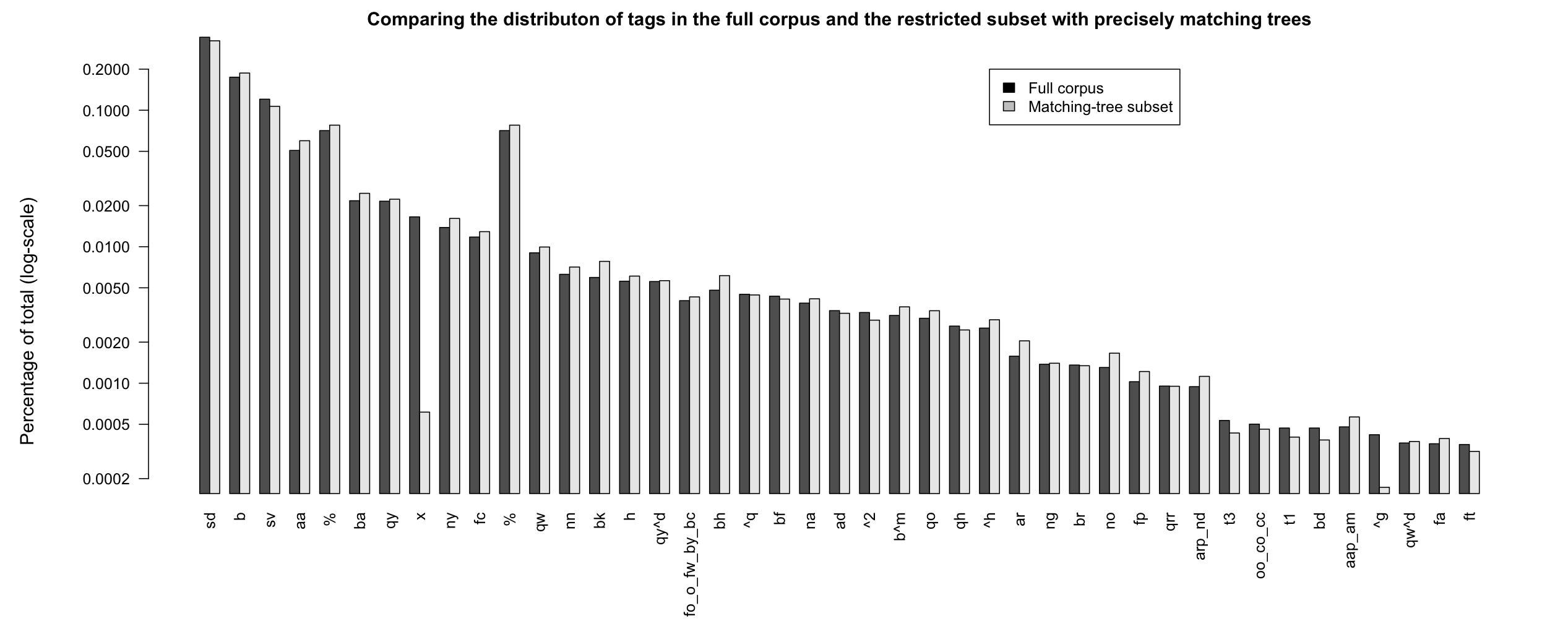
Figure PERCOMPARE
Comparing percentages of tags for the full corpus and the
restricted subset that have single, precisely matching trees.
The Switchboard Dialog Act Corpus (SwDA) extends the Switchboard-1 Telephone Speech Corpus, Release 2, with turn/utterance-level dialog-act tags. The tags summarize syntactic, semantic, and pragmatic information about the associated turn. The SwDA project was undertaken at UC Boulder in the late 1990s.
Recommended reading:
Note: Here is updated SwDA code that is Python 2/3 compatible. It is recommended over the code below.
Code and data:
The SDA trascripts are a free download:
The files are human-readable text files with lines like this:
b          B.22 utt1: Uh-huh. /

sd          A.23 utt1: I work off and on just temporarily and usually find friends to babysit,  /
sd          A.23 utt2: {C but } I don't envy anybody who's in that <laughter> situation to find day care. /

b          B.24 utt1: Yeah. /
It's worth unpacking the archive file and opening up a few of the transcripts to get a feel for what they are like.
The SwDA is not inherently linked to the Penn Treebank 3 parses of Switchboard, and it is far from straightforward to align the two resources Calhoun et al. 2010, §2.4. In addition, the SwDA is not distributed with the Switchboard's tables of metadata about the conversations and their participants. I'd like us to have easy access to all this information, so I created a version of the corpus that pools all of this information to the best of my ability:
When you unpack swda.zip, you get a directory with the same basic structure as that of swb1_dialogact_annot.tar.gz. The file swda-metadata.csv contains the transcript and caller metadata for this subset of the Switchboard.
The format for all the transcript files is the same. I describe the column values below, in the context of the Python code I wrote for us to work with this corpus.
The Python classes:
The code's Transcript objects model the individual files in the corpus. A Transcript object is built from a transcript filename and the corpus metadata file:
Transcript objects have the following attributes:
| Attribute name | Object type | Value |
|---|---|---|
| ptb_basename | str | The filename: directory/basename |
| conversation_no | int | The numerical conversation Id. |
| talk_day | datetime | with methods like month, year, ... |
| topic_description | str | short description |
| length | int | in seconds |
| prompt | str | long decription/query/instruction |
| from_caller_no | int | The numerical Id of the from (A) caller |
| from_caller_sex | str | MALE, FEMALE |
| from_caller_education | int | 0, 1, 2, 3, 9 |
| from_caller_birth_year | datetime | YYYY |
| from_caller_dialect_area | str | MIXED, NEW ENGLAND, NORTH MIDLAND, NORTHERN, NYC, SOUTH MIDLAND, SOUTHERN, UNK, WESTERN |
| to_caller_no | int | The numerical Id of the to (B) caller |
| to_caller_sex | str | MALE, FEMALE |
| to_caller_education | int | 0, 1, 2, 3, 9 |
| to_caller_birth_year | datetime | YYYY |
| to_caller_dialect_area | str | MIXED, NEW ENGLAND, NORTH MIDLAND, NORTHERN, NYC, SOUTH MIDLAND, SOUTHERN, UNK, WESTERN |
| utterances | list | A list of Utterance objects. |
The attributes permit easy access to the properties of transcripts. Continuing the above:
The utterances attribute of Transcript objects is the list of Utterance objects for that corpus, in the order in which they appear in the original transcripts.
Utterance objects have the following attributes:
| Attribute | Object type | Value |
|---|---|---|
| caller | str | A, B, @A, @B, @@A, @@B |
| caller_no | int | The caller Id. |
| caller_sex | str | MALE or FEMALE |
| caller_education | str | 0, 1, 2, 3, 9 |
| caller_birth_year | int | 4-digit year |
| caller_dialect_area | str | MIXED, NEW ENGLAND, NORTH MIDLAND, NORTHERN, NYC, SOUTH MIDLAND, SOUTHERN, UNK, WESTERN |
| transcript_index | int | line number relative to the whole transcript |
| utterance_index | int | Utterance number (can span multiple TranscriptIndex numbers) |
| subutterance_Index | int | Utterances can be broken across line. This gives the internal position. |
| tag | list | strings; see below |
| text | str | the text of the utterance |
| pos | str | the part-of-speech tagged portion of the utterance |
| trees | nltk.tree.Tree | the parse of Text; see below for discussion |
Assuming you still have your Python interpreter open and the trans instance set as before, you can continue with code like the following:
Perhaps the most noteworthy attribute is utt.trees. This is always a set of nltk.tree.Tree objects (sometimes an empty set, because only a subset of the Switchboard was parsed). For our utt instance, there is just one tree, and it properly contains the actual utterance content. In this case, the rest of the tree occurs two lines later, because speaker A interrupts:
Cautionary note: Because the trees often properly contain the utterance, they cannot be used to gather word- or phrase-level statistics unless care is taken to restrict attention to the subtrees, or fragments thereof, that represent the utterance itself. For additional discussion, see the Penn Discourse Treebank 3 Trees section below.
The main interface provided by swda.py is the CorpusReader, which allows you to iterate through the entire corpus, gathering information as you go. CorpusReader objects are built from just the root of the directory containing your csv files. (It assumes that swda-metadata.csv is in the first directory below that root.)
The two central methods for CorpusReader objects are iter_transcripts() and iter_utterances().
Here's a function that uses iter_transcripts() to gather information relating education levels and dialect areas:
The method iter_utterances() is basically an abbreviation of the following nested loop:
The following code uses iter_utterances() to drill right down to the utterances to count the raw tags:
The output is a list that is very much like the one under "Finally, for reference, here are the original 226 tags" at the Coders' Manual page. (I don't know why the counts differ slightly from the ones given there. I tried many variations — adding/removing * or @ from the tags; adding/removing a hard-to-detect nameless file in the distribution repeating sw09utt/sw_0904_2767.utt, etc., but I was never able to reproduce the counts exactly.)
It is possible to work with our SwDA CSV-based distribution using a program like Excel or R. The following code shows how to read in the CSV files and work with them a bit in R:
We can also read in the metadata and relate an utterance to it via the conversation_no value:
In principle, this could be every bit as useful as the Python classes. Indeed, there are advantages to working with data in tabular/database format, as opposed to constantly looping through all the files. However, if you take this route, you'll have to write your own methods for dealing with the special values for trees, tags, dates, and so forth. I think Python is ultimately a better tool for grappling with the diverse information in the SwDA.
I now briefly review the special annotations of this subset of the Switchboard: the act tags, the POS annotations, and the parsetrees.
There are over 200 tags in the corpus. The Coders' Manual defines a system for collapsing them down to 44 tags. (They say 42; I am not sure what they do with 'x', and their table has 43 rows, so it might be that 42 is just a minor miscount.)
The Utterance object method damsl_act_tag() converts the original tags to this 44 member subset:
The tags are the main addition to the corpus. Here is the table of training-set stats from the Coders' Manual extended with a column giving the total counts for the entire corpus, using damsl_act_tag().
The phrase plays on two psychological triggers:
Scammers use this to drive traffic to survey scams, credential harvesters, or ad-heavy pages with no real unlock.
Let’s get technical. Security researchers have analyzed similar fake keywords (e.g., “v009rewind gallery crack,” “sharp pain unlock tool”). They typically lead to:
| Platform | Content Type | Unlock Model | Monthly Cost | |----------|--------------|--------------|---------------| | OnlyFans | Adult lifestyle | Pay-per-post or sub | $5–50 | | Pixiv Fanbox | Anime/Illustration | Tiered subscription | $3–20 | | Substack | Writing & photo essays | Paid newsletter | $5–15 | | Gumroad | Digital art packs | One-time purchase | $1–50 | | Flickr Pro | Photography galleries | Annual fee | $7.99/mo |
All of these are v011rsp-free and won’t give you a sharp pain (except buyer’s remorse if you oversubscribe).
The phrase “such a sharp pain v011rsp gallery unlock wa lifestyle and entertainment” is a warning label, not a product.
Final recommendation:
Search instead for “best Patreon art galleries 2025” or “how to unlock visual novel CGs legally.” You’ll find real entertainment without the sharp pain – or the malware.
Stay safe, unlock wisely, and never trust random version strings.
Word count: ~1,250. Article can be expanded with more game-specific unlock guides or medical disclaimers if needed for SEO depth.
The keyword "such a sharp pain v011rsp gallery unlock wa hot" appears to refer to a specific niche in digital content curation, likely associated with exclusive artistic galleries or locked media collections. While the string itself looks like a technical tag or a localized search term, it captures the intersection of emotional art ("Such a Sharp Pain") and the technical mechanisms of accessing restricted content ("v011rsp gallery unlock"). such a sharp pain v011rsp gallery unlock wa hot
Below is an exploration of the themes, psychological triggers, and technical contexts surrounding this unique keyword. Understanding the "Such a Sharp Pain" Gallery Phenomenon
In the modern digital landscape, keywords like v011rsp gallery often represent specific "keys" to unlocking exclusive media. Whether these galleries are hosted on private servers, specialized apps, or social media platforms like WhatsApp (indicated by the "wa" shorthand), they thrive on the human desire for exclusivity and emotional resonance. 1. The Emotional Hook: "Such a Sharp Pain"
The phrase "such a sharp pain" suggests that the content within this specific gallery is likely centered around raw human emotion, evocative photography, or visual storytelling that deals with heartbreak, vulnerability, or visceral intensity.
Artistic Vulnerability: Many creators use these galleries to showcase work that is too personal or provocative for public feeds.
Narrative Strength: The "sharp pain" may refer to a specific song lyric, a quote, or a thematic series of images designed to leave a lasting impact on the viewer. 2. The Technical Core: What is v011rsp? Technical codes like v011rsp are frequently used as:
Version Identifiers: A specific release or "v-code" for a software update or a digital drop.
Access Codes: A unique identifier used in "unlocking" mechanisms to verify that a user has permission to view a restricted gallery. 1.3.1
Database Markers: A way for creators to organize massive amounts of "hot" or trending content within a larger backend system. 3. The Allure of the "Unlock"
The concept of "unlocking" a gallery taps into the psychological principle of scarcity. When content is gated, it immediately gains perceived value. The phrase plays on two psychological triggers:
Exclusivity: Users often seek out "unlock" methods to join an elite group of viewers who have access to "wa exclusive" (WhatsApp exclusive) content. 1.4.1
Engagement: Communities often form around these keywords as users share tips, codes, or links to bypass restrictions and view the "hot" trending media within. 4. Navigating Restricted Galleries Safely
When searching for ways to unlock content associated with tags like wa hot or v011rsp, it is crucial to maintain digital security:
Avoid Third-Party "Unlockers": Many sites claiming to unlock galleries for free are fronts for malware or phishing attempts.
Official Channels: Always look for the creator’s official social media or website to find legitimate access codes or subscription models.
Content Privacy: If a gallery is locked, respect the creator's intent. Exclusive content is often gated to protect the privacy of the subjects or the integrity of the art. Summary of the Keyword
The string "such a sharp pain v011rsp gallery unlock wa hot" is a hybrid of emotional marketing and technical search intent. It points toward a specific digital experience—likely on a platform like WhatsApp—where users are looking to access high-impact, exclusive visual content through a specific versioning code (v011rsp).
It looks like you’re referencing a specific post or comment with the text:
"such a sharp pain v011rsp gallery unlock wa hot" Scammers use this to drive traffic to survey
If you’re asking whether this is a good post or what it means, here’s a quick breakdown:
Without more context (platform, community, image genre), it’s hard to say if it’s a good post. If it’s from an adult content unlock, “good” might mean effective advertising or engaging wording. If it’s random or broken English, probably not high quality.
Would you like help rewriting it as a clearer, more effective post, or analyzing it for a specific platform (Twitter, Telegram, forum)?
We live in an on-demand entertainment economy. Whether it's exclusive artist content, behind-the-scenes sports galleries, or premium lifestyle vlogs, creators lock their best work for a reason.
The "Unlock" mindset often leads to:
Before diving further into lifestyle and entertainment, let’s address the literal interpretation.
A sharp, sudden pain – especially in the chest, head, or abdomen – can be a medical emergency.
If you searched this term because you are actually feeling a sharp pain while trying to unlock a gallery or play a game, stop and assess:
Do not ignore real pain for digital content. Your health is not a keyword.
Most of the Coders' Manual is devoted to explaining how to make decisions about the tags. This is extremely valuable information if you decide to study the tags for scientific purposes, because the instructions provide insights into what the tags mean and how the annotators made decisions.
Utterance objects have methods for accessing the POS-tagged version of the utterance as a plain string, and as a list of (string, tag) tuples. In addition, optional parameters to the methods allow you to regularize the words and tags in various ways:
utt.pos() gives you the raw string of the POS version:
You can use utt.text_words() to break the raw text on whitespace. More interesting is utt.pos_words(), which does the same for the POS-tagged version, which is often simpler, in that it lacks disfluency markers and information about the nature of the turn.
The option wn_lemmatize=True runs the WordNet lemmatizer:
pos_lemmas() has the same options as pos_words() but it returns the (string, tag) tuples:
As far as I can tell, the alignment between the raw text and the POS tags is extremely reliable, with differences largely concerning elements that were not tagged (mostly disfluency markers and non-verbal elements).
Not all utterances have trees; only a subset of the Switchboard is fully parsed. Here's a quick count of the utterances with parsetrees:
There are 221616 utterances in all, so about 53% have trees.
The relationship between the utterances/POS and the trees is highly frought. There is no simple mapping from the original release of the corpus, or the POS version, to the trees. For the parsing, some utterances were merged together into single trees, others were split across trees, and the basic numbering was changed, often dramatically. I myself did the text–POS–tree alignments automatically (not by hand!) using a wide range of heuristic matching techniques. There are definitely lingering misalignments. (If you notice any, please send me the transcript and utterance number.)
In the example used just above, the utterance and its POS match the tree, with the non-matching material being just trace markers and disfluency tags:
Sometimes the utterance corresponds to a subtree of a given tree. In that case, utt.trees includes the entire tree, and it is important to restrict attention to the utterance's substructure when thinking about (counting elements of) the tree(s):
Here, one can imagine pulling out (FRAG (IN if) (RB not) (ADJP (JJR more))) to work with it separately from its containing tree. NLTK tree libraries have a subtrees() method that makes this easy:
The most challenging situation is where the utterance overlaps two trees, but does not correspond to either of them, or even to identifiable subtrees of them:
Here, there is no unique node that dominates right, ?, and the disfluency marker but excludes the rest of the utterance
Of course, the easiest tree structures to deal with are those that correspond exactly to the utterance itself. The Utterance method tree_is_perfect_match() allows you to pick out just those situations. It does this by heuristically matching the raw-text terminals with the leaves of the tree structure. The following function counts the number of such utterances:
The output of the above is 96370 (0.829738688708 percent). This suggests that, when studying the trees, we can limit attention to matching-tree subset. However, we should first look to make sure that the overall distribution of tags is the same for this subset; it is conceivable that a specific tag never gets its own tree and thus would appear less in this subset.
Figure PERCOMPARE compares the percentages in Table DAMSL with the percentages from the restricted subset that that have full-tree matches. The distributions looks largely the same, suggesting that work involving parsetrees can limit attention to the matching-tree subset. However, if an analysis focuses on a specific subset of the tags, then more careful comparison is advised. (For example, x (non-verbal) and ^g (tag-questions) seem to be quite different from this perspective: non-verbal utterances are typically not parsed at all, and tag-questions are often treated as their own dialogue act but merged with the preceding tree when parsed.)
exercise ROOTS, exercise POS, exercise TAGS
SAMPLE Pick a transcript at random and study it a bit, to get a sense for what the data are like. Some things you might informally assess:
META The following code skeleton loops through the transcripts, creating an opportunity to count pieces of meta-data at that level. Complete the code by counting two different pieces of meta-data. Submit both the code and its output as your answer.
Advanced extension: allow the user to supply a Transcript attribute as the argument to the function, and then use that attribute inside the loop, to compile its cont distribution.
ROOTS The following skeletal code loops through the utterances, creating an opportunity to counts utterance-level information.
POSThis question compares heavily edited newspaper text with naturalistic dialogue by looking at the distribution of POS tags in two such resources.
TAGS How are tag questions parsed? Choose one of the following two methods for addressing this:
Home
 This work is licensed under a Creative Commons Attribution-NonCommercial-ShareAlike 3.0 Unported License.